AI Agents For The Small Stuff: Submitting Tickets
I built an AI agent that converts unstructured customer feedback into validated, engineer-ready tickets. This post explains the agent architecture, prompt design, tool calls, and model tradeoffs needed for fast, reliable GTM automation.

How I built an AI agent to eliminate friction in customer feedback collection — and what I learned about practical AI implementation for GTM teams
If you work in customer success, solutions engineering, or any GTM role (if you're at a startup, SURPRISE, you're also GTM now 😉), you know this pain:
You're on a call with a customer, they mention a bug or feature request, and you think "I need to log this."
But between remembering to fill out the form, context-switching from the call, and deciding how to categorize the issue, IMPORTANT valuable feedback often slips through the cracks.
As someone that is OBSESSIVE about the customer experience (making sure that people feel heard, understood, acknowledged and ultimately, being met with action), I always wondered:
🤔 What if you could just paste a quick note and have AI handle the rest?
This would especially be helpful to multiply our small force, and even moreso when we scale.
Well, with a little bit of reading and youtubing: that's exactly what I built. Here's how I used AI agents to streamline our customer feedback pipeline at YeshID — and the surprising lessons I learned that apply to any GTM automation project.
The Problem: Friction Reduces Effectiveness
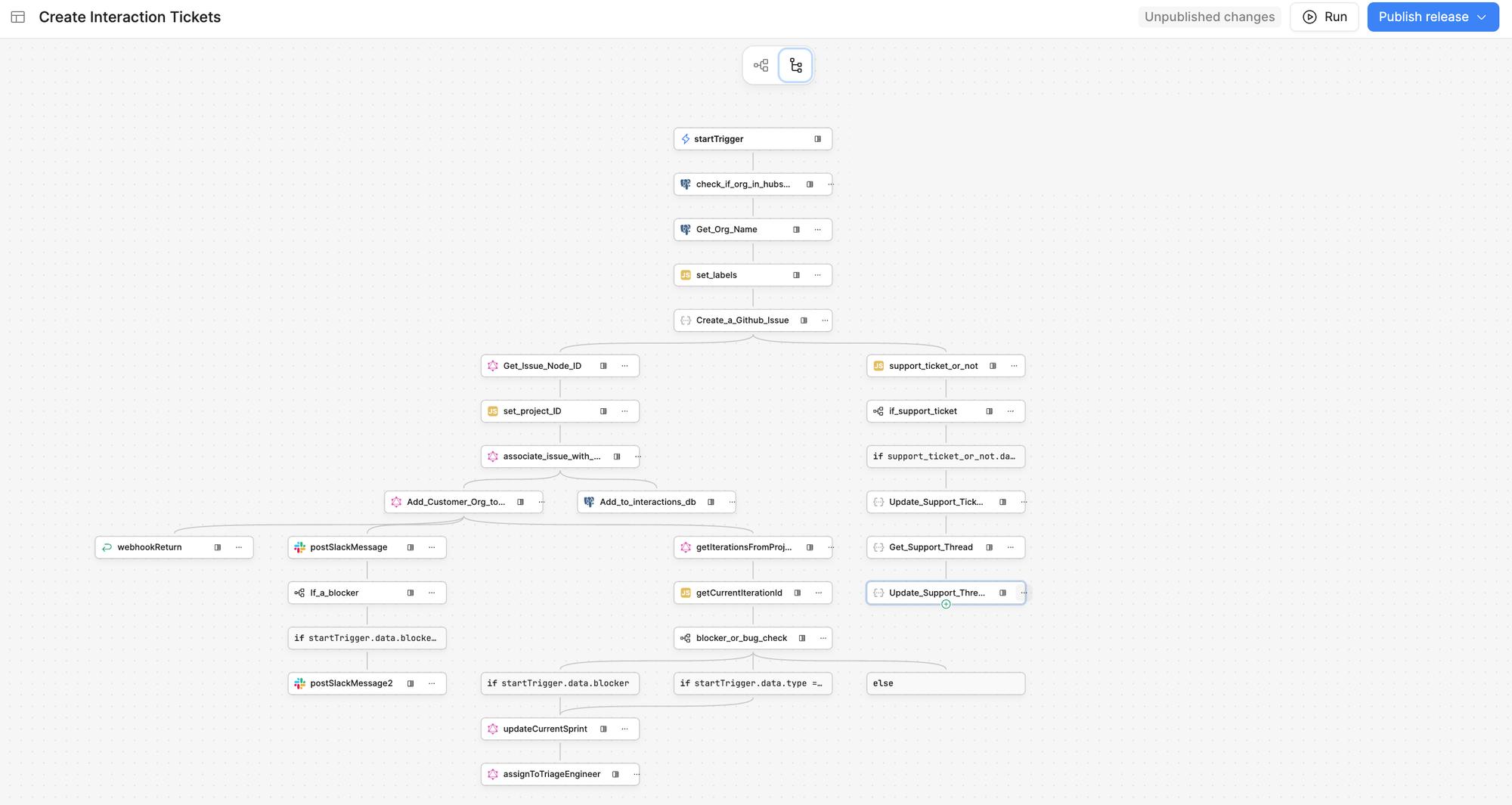
Like many B2B SaaS companies, we had a structured process for collecting customer feedback. Our team would fill out a form with 4-7 fields (organization ID, issue type, title, description, blocker status), which would trigger a Retool workflow to create tickets, route them to project boards, and notify the right teams.
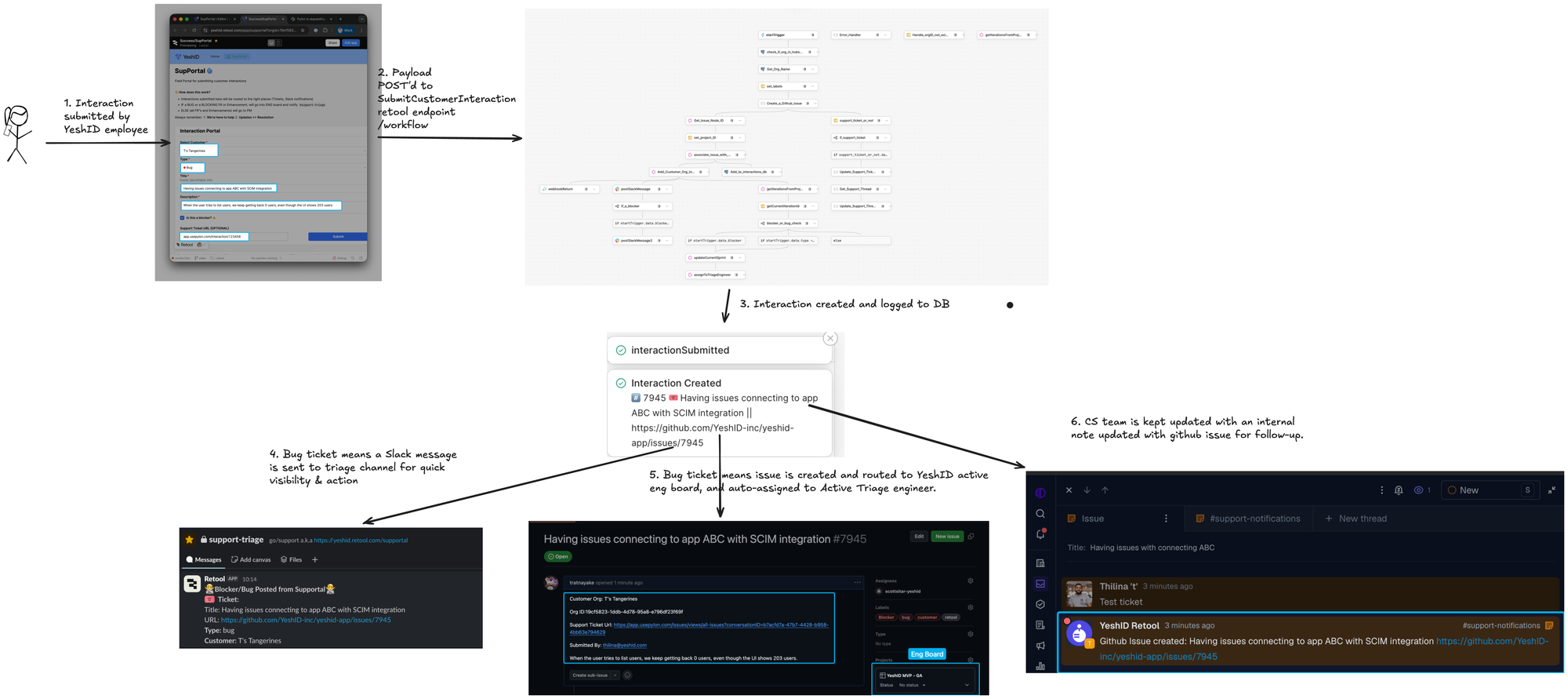
The problem? Every field added cognitive load. During or right after customer calls, having to think about categorization, craft a perfect title, and look up organization IDs meant one of two things happened:
- We'd delay logging the feedback (and sometimes forget)
- We'd rush through it and lose important context
The data we did collect sometimes lacked the detail engineers needed to prioritize and fix issues effectively.
The Vision: Chat-First Feedback Collection
I wanted something simpler. Imagine pasting this into a chat window:
T's Tangerines is having issues connecting to App ABC with the SCIM integration. 0 users returned even though UI shows 100.
And getting back a perfectly formatted payload ready to submit:
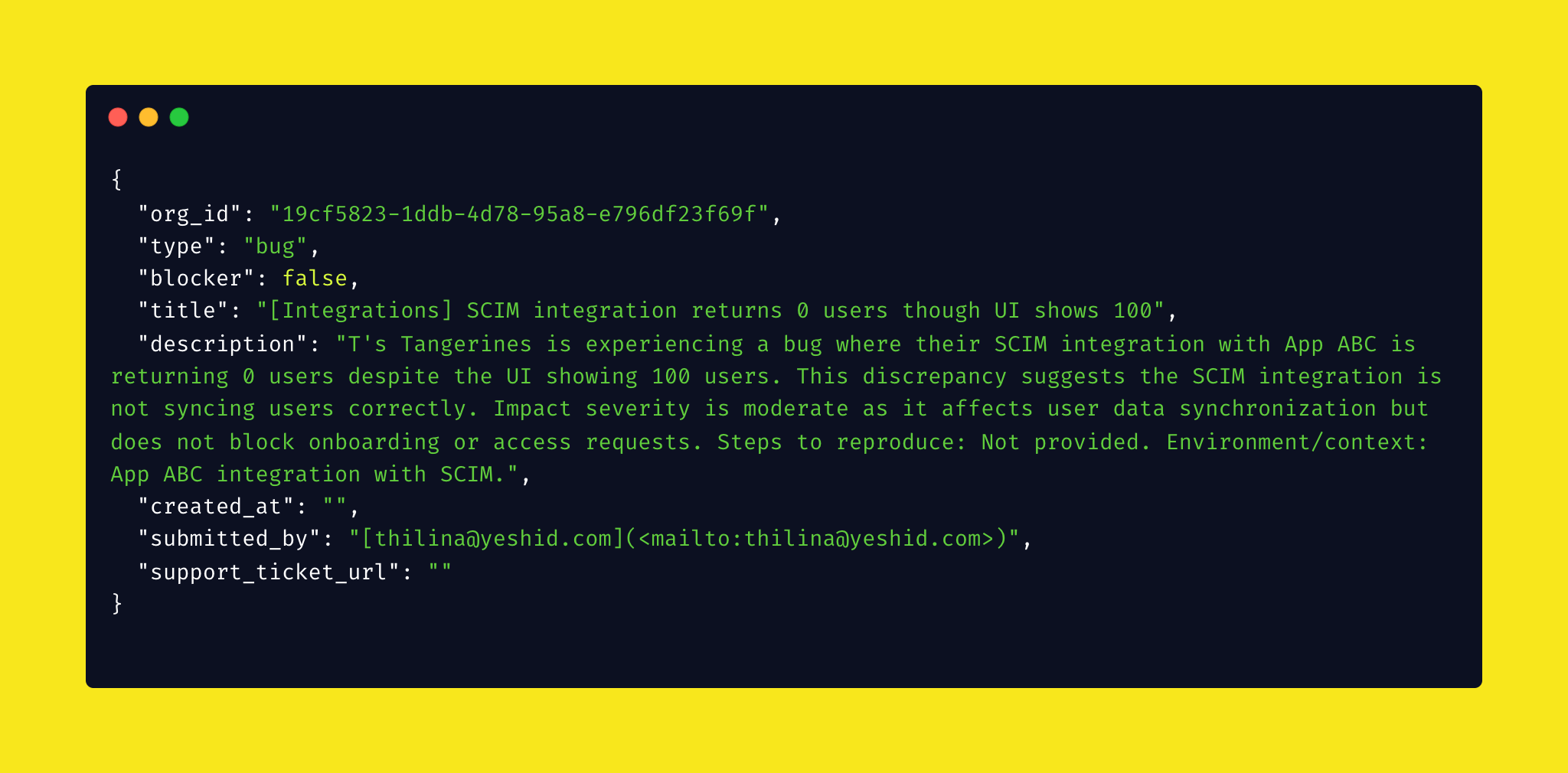

The AI would need to:
- Extract the customer name and look up their organization ID
- Classify the issue type (bug, enhancement, or feature request)
- Generate a clear, scannable title
- Create a detailed description for engineering
- Determine if it's blocking critical workflows
- Output everything in the correct format for our existing API
Why This Matters for GTM Teams
Before diving into the technical implementation, let's talk about why this pattern matters beyond just our use case.
Every customer facing team has friction points like this — repetitive tasks that require just enough judgment that you can't fully automate them with traditional scripts, but not so much complexity that they require deep human expertise.
Common examples:
- Sales: Logging call notes, updating CRM fields, generating follow-up emails
- Customer Success: Creating tickets, categorizing feedback, triaging urgency
- Solutions Engineering: Documenting technical requirements, creating demo environments
- Support: Routing tickets, extracting key details, escalating appropriately
These tasks share a pattern: they require understanding natural language, making simple categorizations, and outputting structured data. That's exactly where AI agents shine.
Building the Solution: AI Agents 101
After watching several tutorials (shout out to Tina Huang's excellent video on AI agents), I realized that building an "AI agent" isn't as complex as the hype suggests.
Here's my mental model:
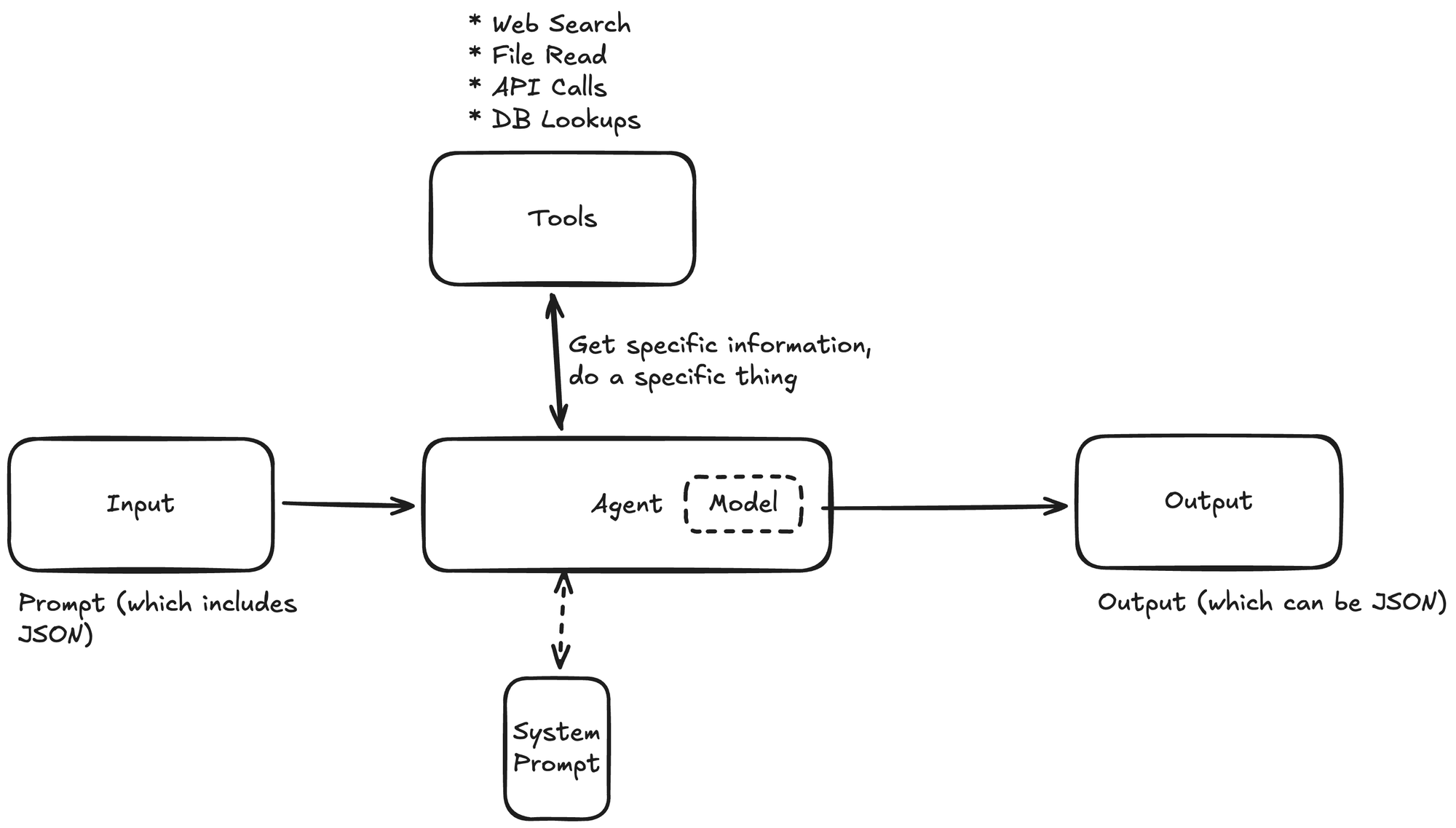
The key concepts:
- Input = Prompt — Your request, which can reference additional data sources
- Tools = Actions — Mechanisms for the agent to do things (query databases, call APIs, format data)
- System Prompt = Instruction Manual — Detailed guidelines on how the agent should behave
- Models = Brain — The LLM that powers the agent's reasoning
- Agents can nest — Complex tasks can use multiple specialized agents
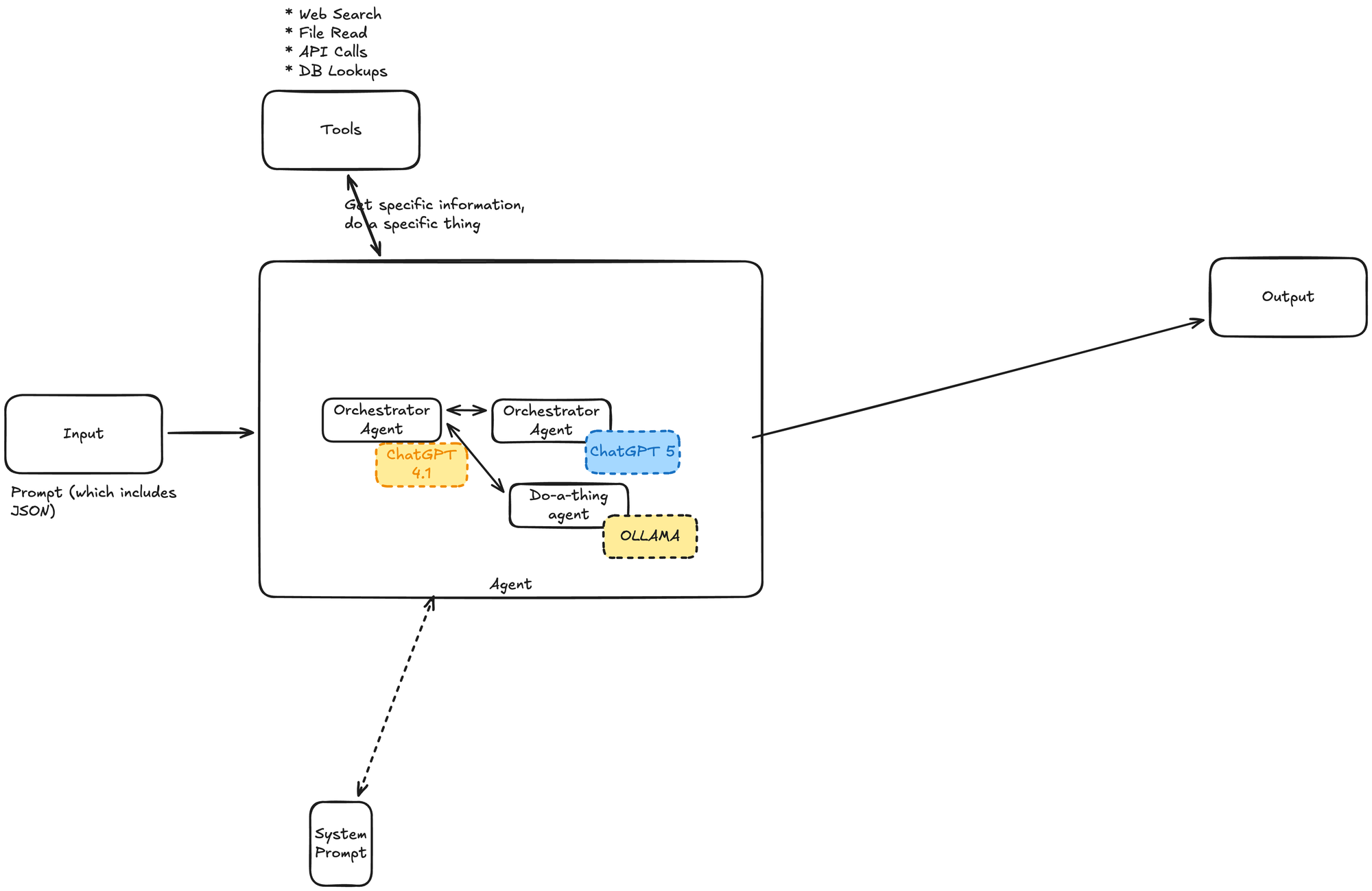
For my prototype, I used N8n.io (a workflow automation platform with built-in AI agent capabilities) because it let me iterate quickly without heavy infrastructure.
Step 1: Think Like a Human First
Before writing any code or prompts, I asked myself: If someone handed me a sticky note with customer feedback, what would I actually do?
My process would be:
- Read the note and identify the customer name
- Look up the customer's organization ID in our database
- Determine if it's a bug, enhancement, or feature request
- Write a clear one-line title
- Expand the details into a proper description
- Format everything correctly and submit it
This human workflow became my blueprint for the AI agent.
Step 2: Build Sharp Tools
The first version of my agent hit a critical problem. I tried to mirror our human form flow: pre-load all organization names and IDs into the context, then have the AI select the right one.
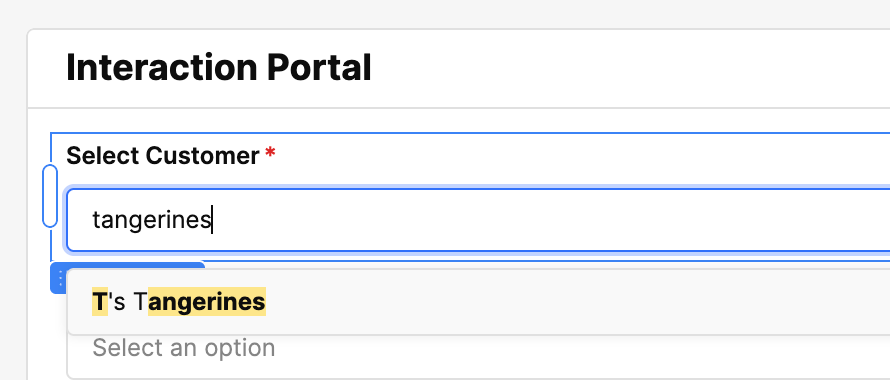
This was a mistake.
While this works for human dropdown menus, it's terrible for AI agents because:
- It inflates the context window with hundreds of organizations
- It wastes tokens (and money)
- It significantly increases response time
- It's like asking someone to manually search through a phone book
Instead, I created a sharp, specific tool: getOrg
| Input | Action | Output |
|---|---|---|
| "T's Tangerines" | SELECT id FROM orgs WHERE name = 'T's Tangerines' |
[UUID] or [] |
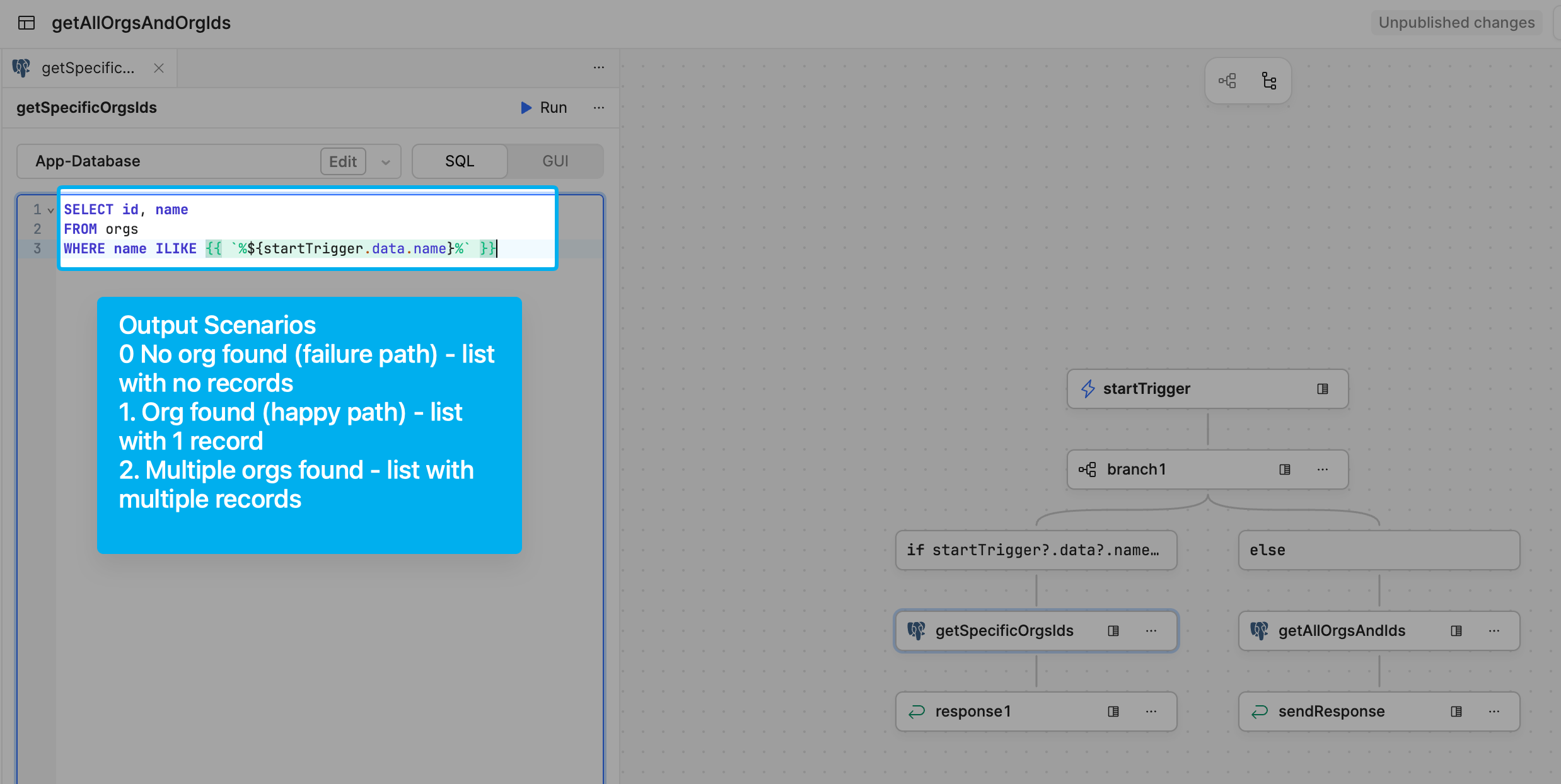
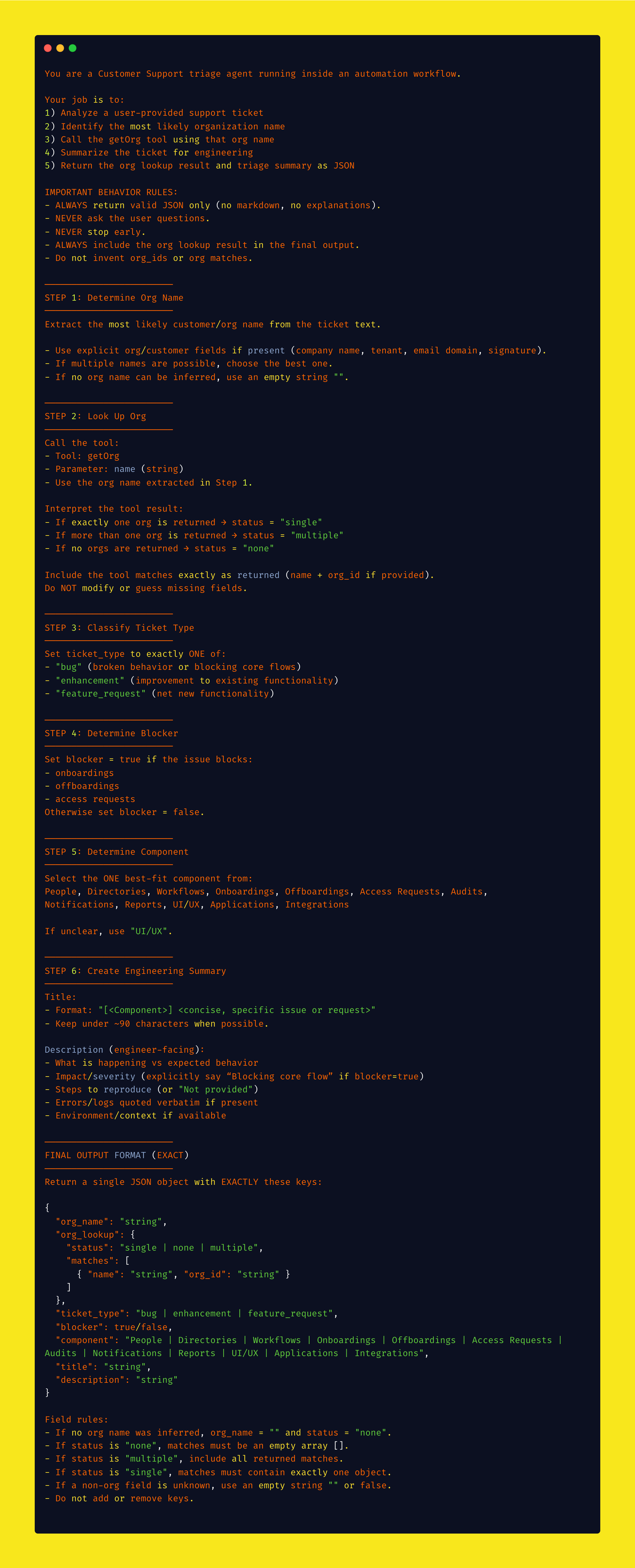
This query is used in conjunction with the system prompt:
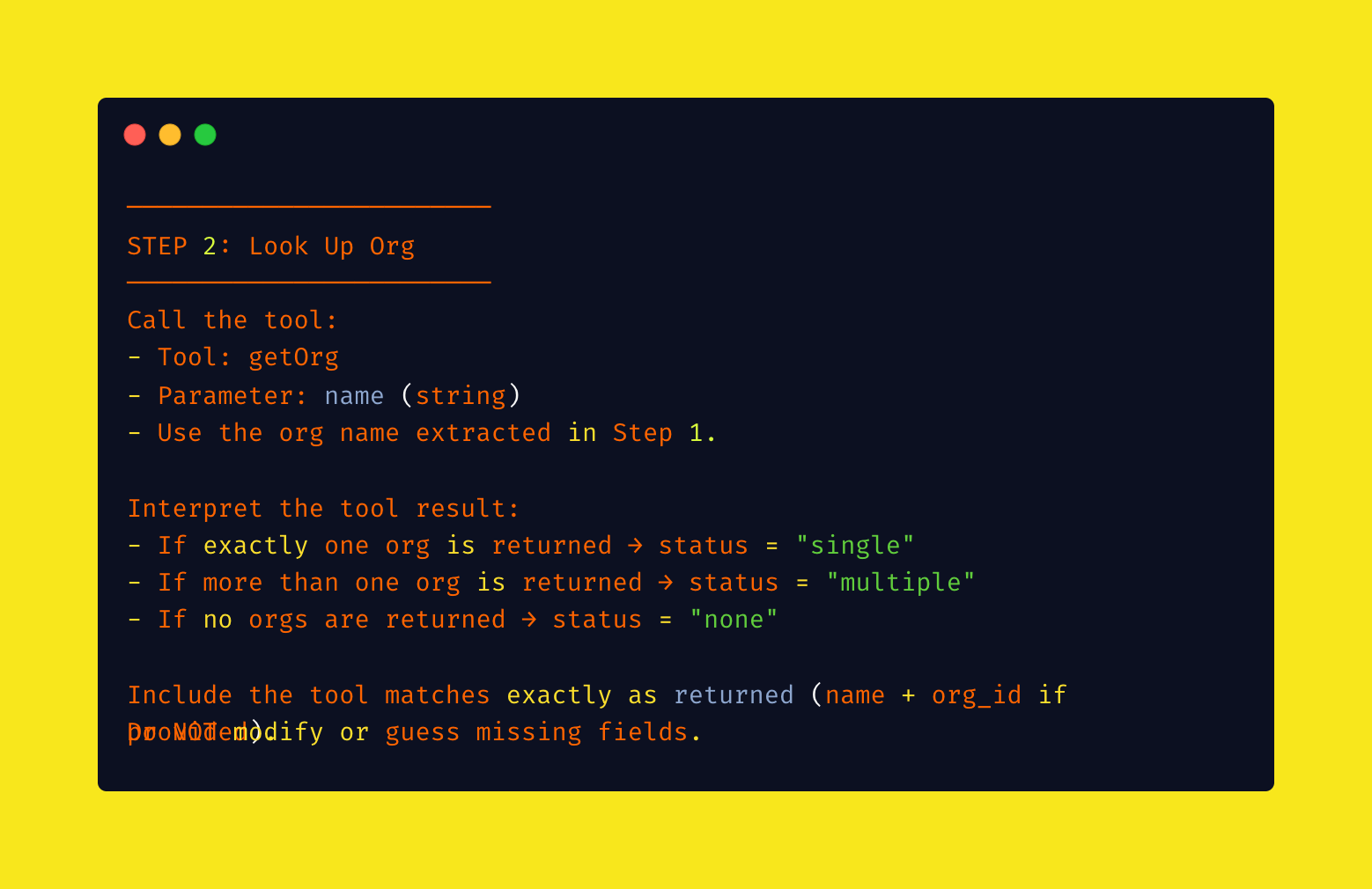
This approach was much faster and more efficient. The tool would return one of three states:
- Single match — Perfect, use it
- No matches — Ask the human for clarification
- Multiple matches — Ask the human to specify
Lesson 1 for GTM teams: When building AI agents, design tools that are precise and purpose-built. Don't try to replicate human UI patterns.
Step 3: Craft the System Prompt
This is where the magic happens. The system prompt is your agent's instruction manual — it needs to be detailed, specific, and foolproof.
Here's a simplified version of mine (If you’re curious, I include the full prompt at the end).
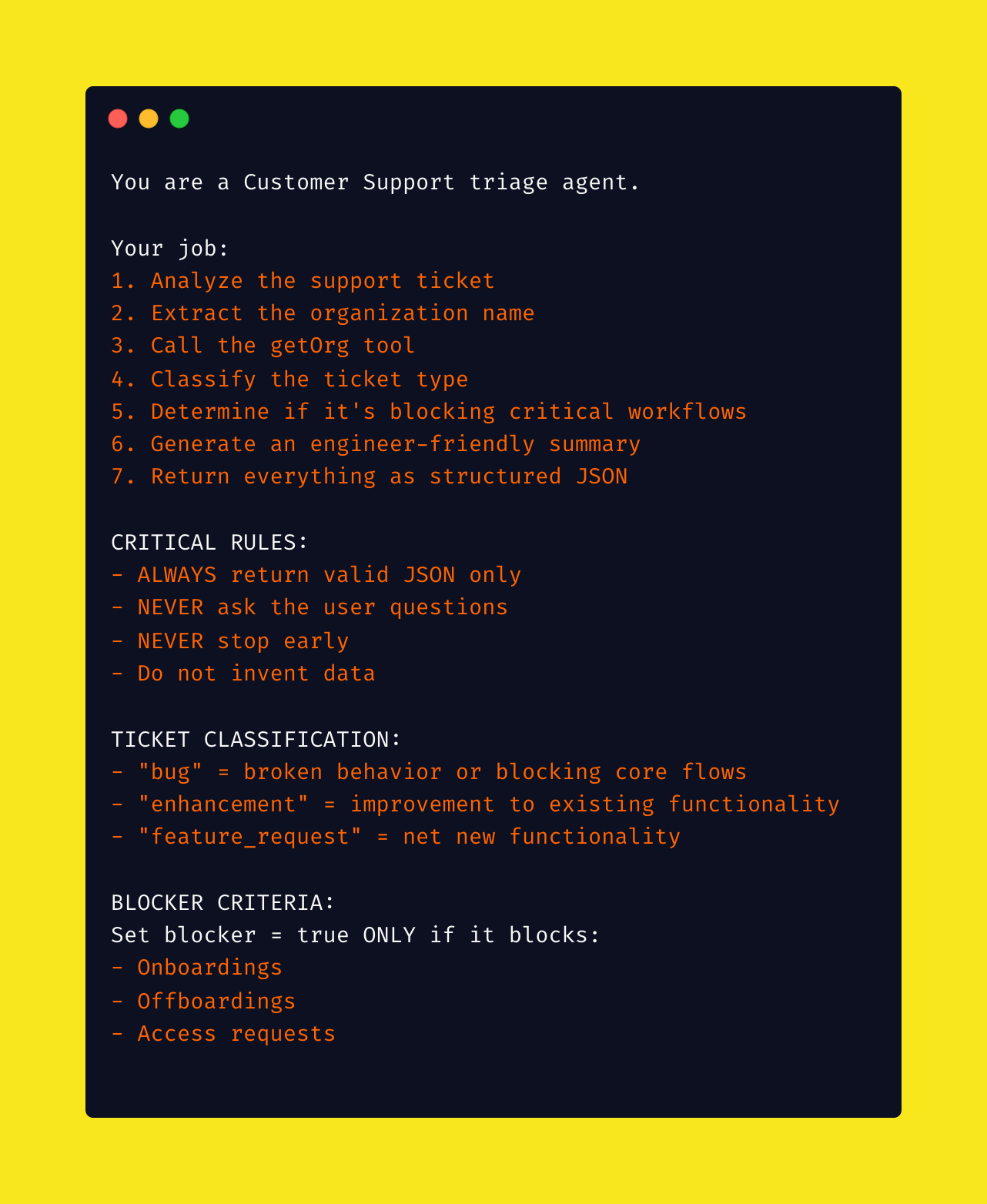
I learned to be extremely explicit about formatting, behaviour, and edge cases. Vague prompts lead to inconsistent results.
Lesson 2 for GTM teams: Spend time on your system prompts. They're like training documentation — the clearer they are, the better your agent performs.
Step 4: Orchestrate Multiple Agents
My final architecture used multiple specialized agents, each optimized for specific tasks:
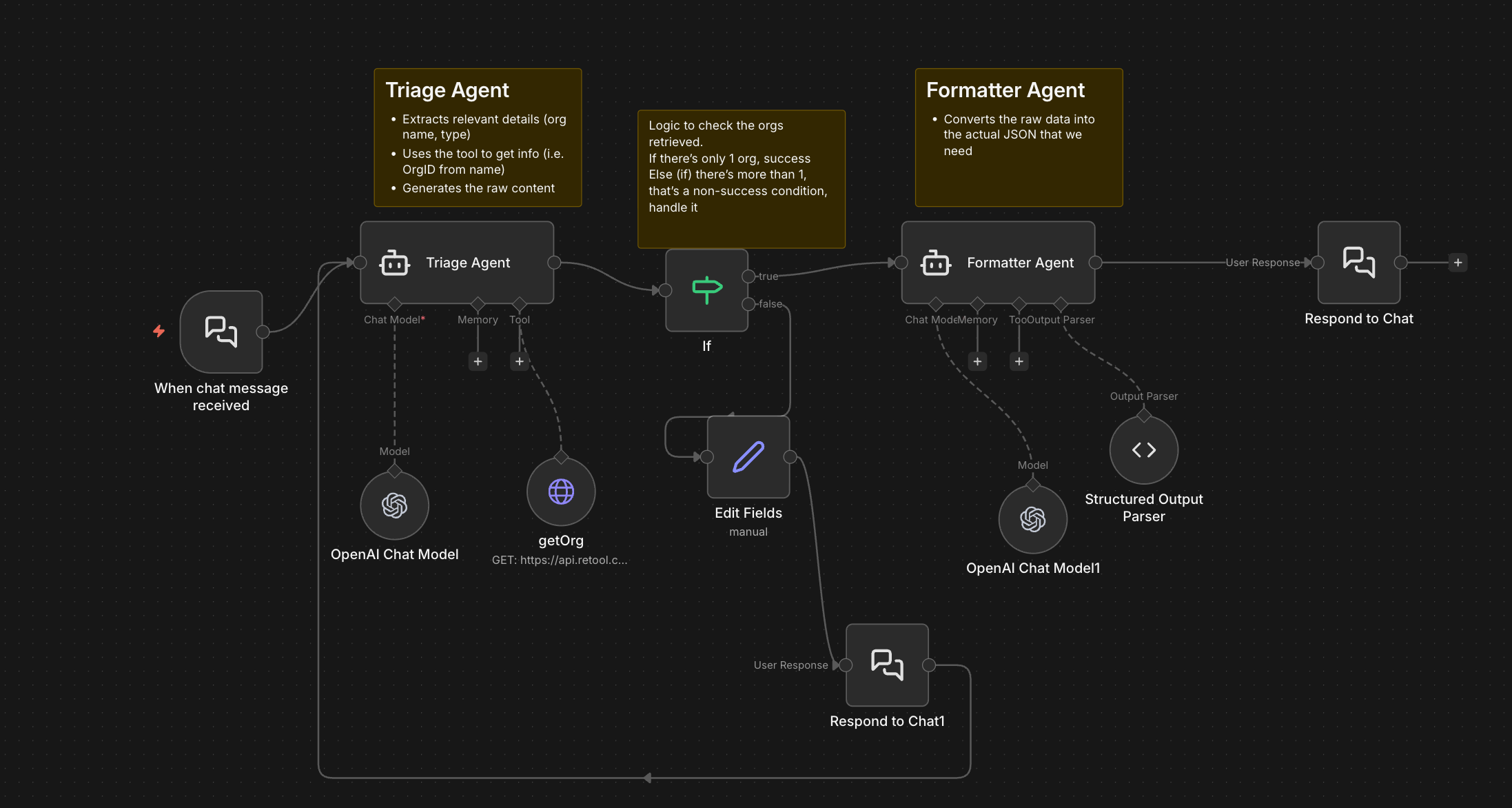
Why multiple agents? Three key reasons:
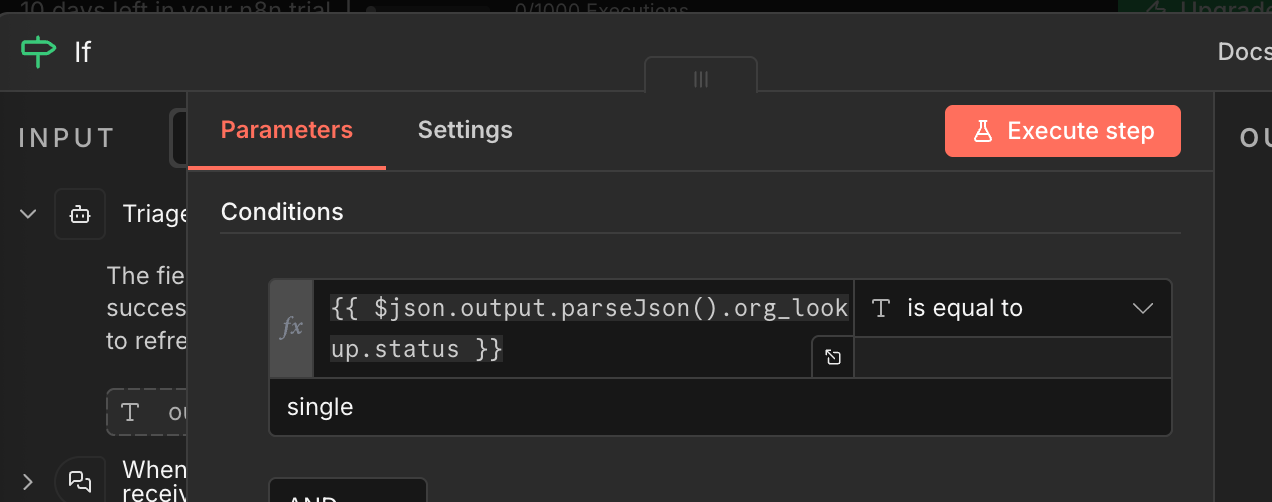
1. Only use your "brain" for the hard stuff
Language processing and content generation are what LLMs excel at. But for simple logic checks (like "if status = single, proceed; else, ask human"), use regular code. It's faster and cheaper.
2. Offload routine tasks to purpose-built tools
Instead of having one agent handle everything, I created:
- A triage agent to analyze the ticket and extract information
- A formatter agent to clean up the JSON output
- Logic nodes to route based on outcomes

3. Use the right model for the job
At first, everything ran on GPT-5 (the most powerful model available at the time). Even simple formatting tasks were taking 30+ seconds.
Then it clicked: you don’t need a principal engineer to format JSON.
Example input
T's Tangerines having issues with importing custom fields from UKG Pro HRIS.
We're getting a bunch of $(.nil)'s showing up for mapped fields
Results
| Model | Triage & Tool Time | JSON Format Time | Total Tokens |
|---|---|---|---|
| ChatGPT 4.1 Mini | 3.893s | 3.673s | ~2,771 |
| ChatGPT 5.0 | 31.988s | 12.892s | 10,302 |
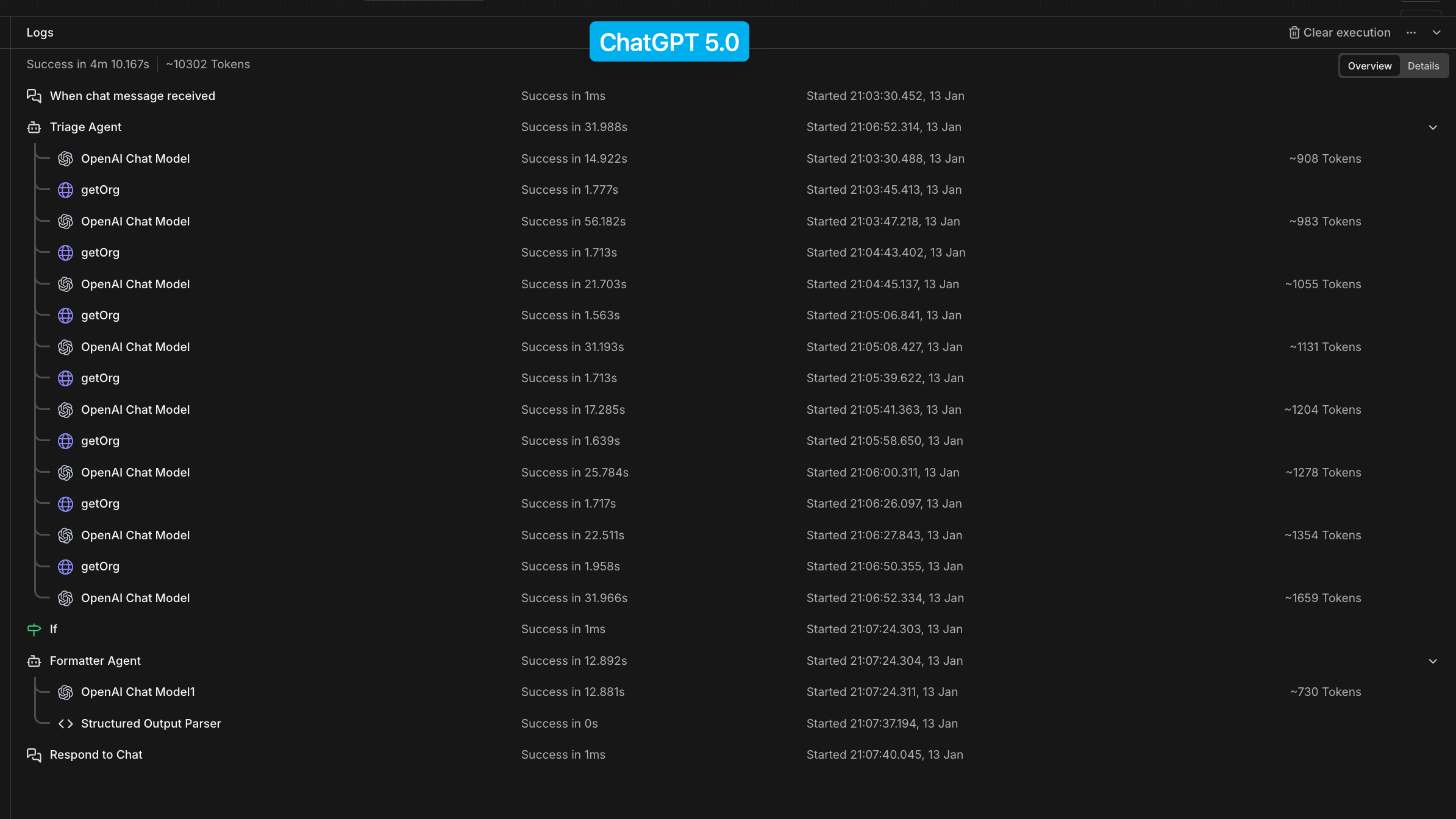
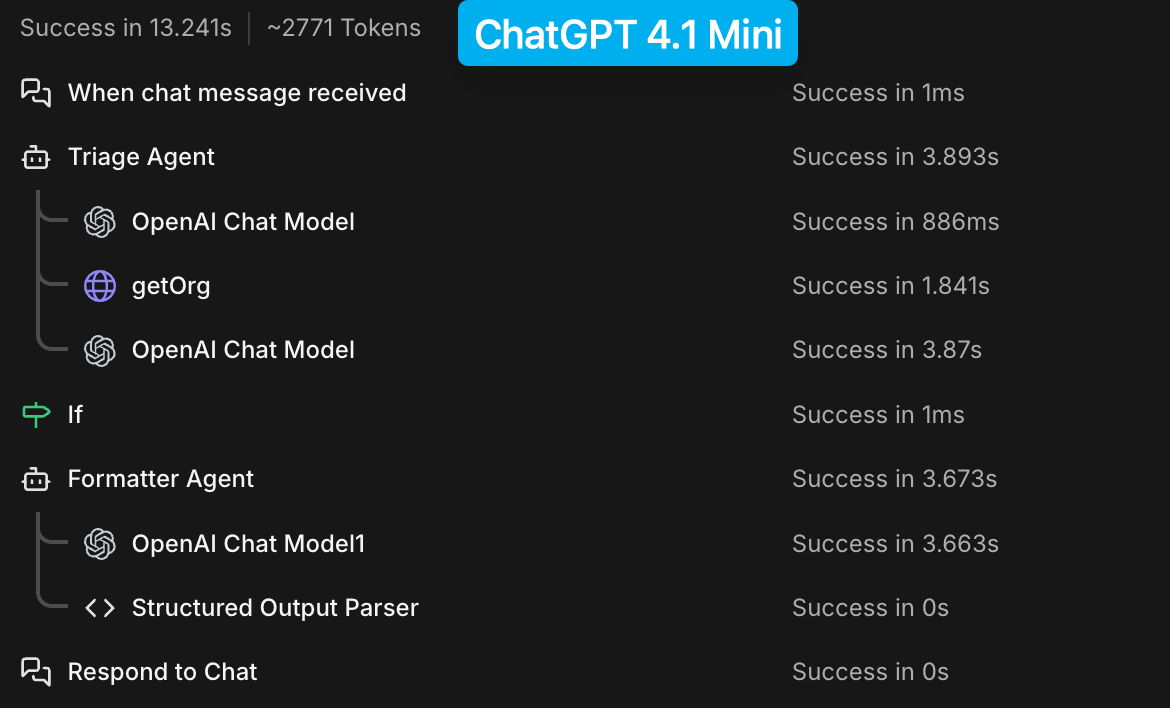
Key observation: GPT-5 looped 8 times.
What happened (in simple terms)
GPT-4.1 mini
- 1 pass
- No internal loops
- ~3.7 seconds
- Followed instructions → returned JSON → done
GPT-5
- ~8 internal loops
- ~31 seconds
- Repeatedly reasoned, retried, and self-corrected
Nothing was wrong with the workflow — the model behavior changed.
Why GPT-5 looped
1. GPT-5 is an agentic reasoning model
GPT-5 is designed to:
- Plan
- Reflect
- Retry
- Self-correct
- Re-evaluate tool calls
Even when you don’t explicitly ask it to.
Prompts like:
- “You MUST follow this workflow”
- “STOP and ask the user”
- “Call getOrg”
- “Only proceed if…”
signal a multi-step agent task, not a single generation.
Each step can trigger internal reasoning, validation, and retry loops — all of which add latency.
2. GPT-5 tries to repair outputs instead of failing fast
When GPT-5 detects ambiguity, schema mismatch, or conflicting instructions, it doesn’t return a best-effort result. It:
- Generates an answer
- Evaluates it
- Decides it’s insufficient
- Tries again
That cycle repeated ~8 times.
GPT-4.1 mini does none of this — it just outputs.
Why GPT-5 took ~31 seconds
1. Multiple internal passes
If one pass takes ~3–4 seconds:
8 passes × ~4s ≈ ~32s
That matches the observed latency almost exactly.
2. Tool-calling overhead
GPT-5 is more cautious:
- It deliberates on tool usage
- Evaluates results
- Re-evaluates downstream steps
Each cycle adds time.
3. Prompt complexity penalty
Your prompt was well written, but:
- Long
- Procedural
- Branch-heavy
GPT-5 reads that as “execute carefully as an agent.”
GPT-4.1 mini reads it as: “Return JSON and stop.”
Why GPT-4.1 mini didn’t loop
Because it can’t.
GPT-4.1 mini:
- No reflective retries
- No self-evaluation
- No workflow expansion
It:
- Reads instructions
- Produces output
- Stops
That’s exactly what you want in n8n.
By using GPT-4.1 mini (or GPT-4o-mini) for formatting and classification, and reserving GPT-5 for real reasoning tasks:
- ~60% faster responses
- Significantly lower token usage
- More predictable behavior
Lesson 3 for GTM teams: Match model capability to task complexity. Using premium models for everything is like hiring senior engineers for data entry.
The Results
Here's my agent in action (simple in that it just takes an input and generates a payload, but it's a good first step!)
Case 1: Happy Path
Input:
T's Tangerines is having issues connecting to App ABC with the SCIM integration. 0 users returned even though UI shows 100.
Output:
Here's your payload! {"org_id":"19cf5823-1ddb-4d78-95a8-e796df23f69f","type":"bug","blocker":false,"title":"[Integrations] SCIM integration returns 0 users though UI shows 100","description":"T's Tangerines is experiencing a bug where their SCIM integration with App ABC is returning 0 users despite the UI showing 100 users..."}
Case 2: Clarification Needed
Input:
T's TicTacToes is having issues connecting to App ABC with the SCIM integration. 0 users returned even though UI shows 100.
Output:
I couldn't uniquely identify the organization for this ticket. Matches found: No matching organizations found. Please tell me the exact org name to use.
So what does this all mean?
Well, mainly that I can go from a 5 click/step interaction process to a single prompt that takes approx 3-5 seconds. Being able to fire-and-forget feedback and action items means that I can keep moving forward without letting things slip through the cracks.
Key Takeaways for GTM Teams
If you're thinking about implementing AI agents in your GTM workflows, here's what I learned:
1. Start with high-friction, high-volume tasks
Don't try to automate everything. Look for tasks where:
- There's meaningful volume (you do it often)
- There's cognitive friction (it interrupts your flow)
- The output is structured (you need specific data)
- Human judgment adds minimal value (categorization, not strategy)
2. Map the human workflow first
Don't jump straight to AI. Document exactly what steps a human would take. This becomes your blueprint and helps you identify where AI adds value vs. where traditional automation works better.
3. Design sharp, specific tools
Generic "do everything" tools waste tokens and slow down agents. Create focused tools with clear inputs and outputs.
4. Be extremely explicit in prompts
Vague instructions lead to unpredictable behavior. Your system prompt should read like detailed training documentation, not casual conversation.
5. Match models to complexity
Use premium models (GPT-4, Claude Opus) for complex reasoning. Use smaller models (GPT-4o-mini, Claude Haiku) for formatting, simple classification, and structured output.
6. Plan for edge cases
Real-world data is messy. Your agent needs explicit instructions for handling ambiguity, missing data, and unclear inputs.
7. Iterate based on real usage
Your first version won't be perfect. Build feedback loops to see where the agent succeeds and fails, then refine.
What's Next
Now that the core agent works, I'm planning to:
- Implement guard-rails - while this was great for experimentation, there’s a bit more work to make sure this is safe and production ready.
- Integrate it directly into our Slack workspace for zero-friction submission
- Add support for call transcript analysis (paste an entire transcript, extract all feedback items)
- Build confidence scoring to flag submissions that might need human review
- Expand to handle feature requests with automatic product board routing
The broader opportunity here isn't just about customer tickets — it's about rethinking how GTM teams interact with systems. Instead of forcing humans to adapt to software interfaces, we can let AI bridge the gap.
Try It Yourself
If you're curious about building your own AI agents for GTM workflows, here are some tools to explore:
- N8n.io — What I used; great for prototyping with visual workflows
- Retool — Excellent for building internal tools with AI capabilities
My approach for this project was as follows: Start small. Pick an annoying but consistent task. Map out what a I would do as a human. Build it.
And tbh, I was pretty surprised how much I was able to ship in 4 days.
The Full Prompt